Hello Hello!
In this blog, we will be having a very abstracted overview of database indexing inspired from Arpit Bhayani’s video.
Spoiler alert: He is a great teacher!
Let’s start with a scenario first.
We have a table named user_description which contains four attributes (columns): id, name, age and description.
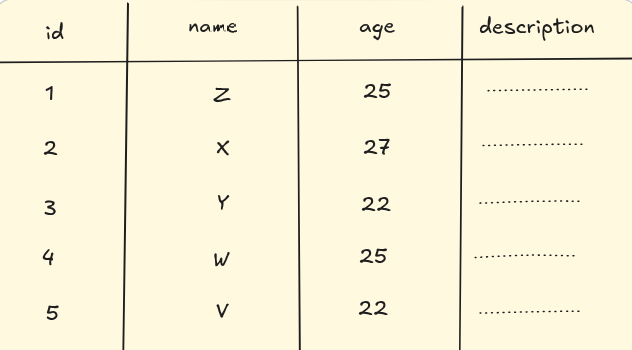
We will be assuming a few things to make our understanding (and lives) easier.
Now, every row that we have will take some memory on our disk, right? And every individual fields themselves will take some memory. For the four fields that we have, let’s assume that they will be taking these much of space:
- id = 20 bytes
- name = 30 bytes
- age = 20 bytes
- description = 80 bytes

So the total amount of space taken by one particular row = 150 bytes.
The disks that we have on our machine are in contiguous blocks of data.
Let’s assume that each block is of 500 bytes. So how many space will the above table will take? The answer is 750 bytes. (150*5 = 750)
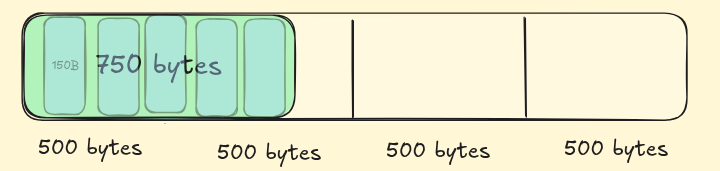
The data retrieval process for a row goes like this:
- the concerned disk is hit
- find and read the whole block where the row is; and load into memory (RAM)
- read the required “bytes”
- then send the “bytes” for further operations.
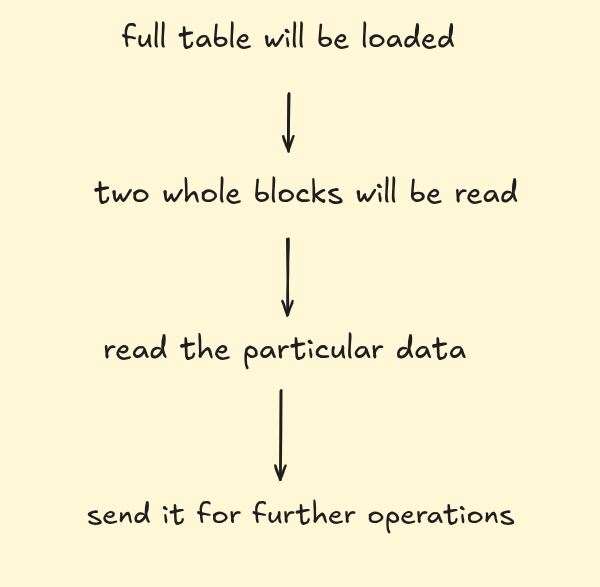
Let’s say we want the data with id = 3, so firstly full table will be loaded —> two whole blocks will be read —> read the particular data —> send it for further operations.
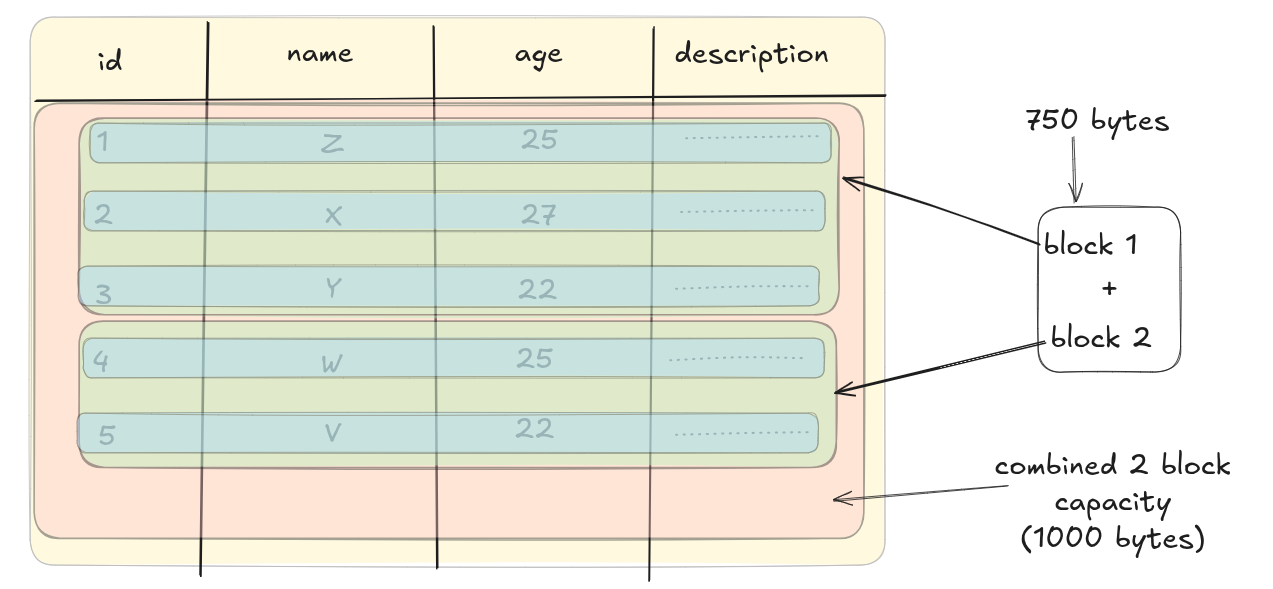
We have five records. Each block can contain 3 full rows, and the 4th one will be partially stored. So for 5 rows in our example we will be using 2 blocks for storage of our table.
Better visualization
Now imagine if we have 100 such rows. In how many block will that fit in?
100*150 = 15000 bytes.
15000/500 = 30 blocks
Now let’s say a user has to get the last element. Assume reading one row takes 1 second, reading whole table of 30 blocks will take 30 seconds. So in terms of time complexity this is is our worst case scenario. (Even if we have to read any random row, the whole table is loaded for that so full table will be loaded in either case)
In order to optimize the search time, engineers came up with database indexing. In super layman term: indexes are smaller referential tables that hold row references against the indexed values. We can think of them like a map; from “indexed-value” to the row in which that concerned value is present.
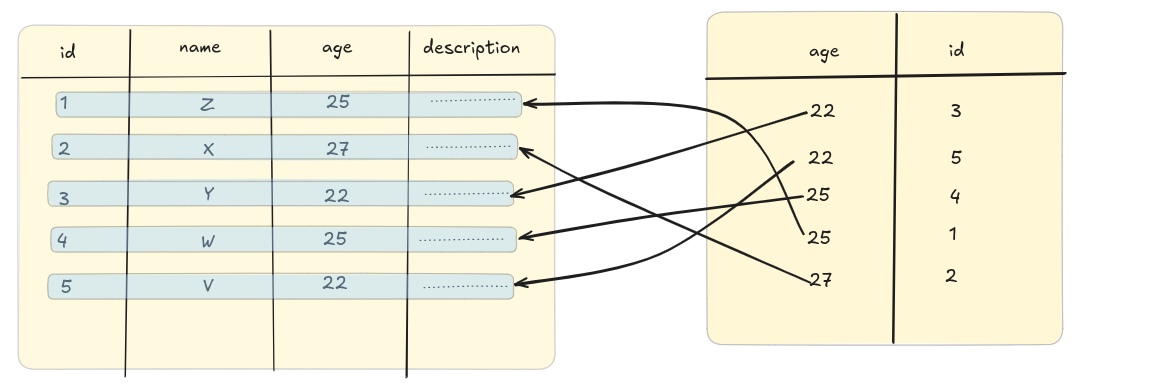
It makes a new table with the “mapped” values. If we apply the index on the “age” columns this is how the new “mapped” table would look like:
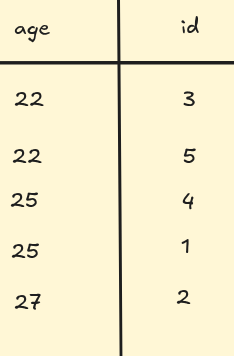 You see the age has been sorted in ascending order. The database internally applies various sorting methods to store. We have simplified this a bit more.
Now, how much does one row of this new table will take?
age = 20 bytes
id = 20 bytes
So total one row will be taking 40 bytes of data now. And, this whole table will take 40*5 = 200 bytes on disk.
If we run the query back to find a particular row from a 100-row table how will that look like?
Side note: to search for one query the database engine traverses essentially every single row so it’s equal to reading the whole 100 rows to find one row.
Earlier, it was taking 30 seconds to traverse a table of block-size of 30 to search for that one particular row. How will the process look like now after indexing?
If we have 100 rows of indexed table we will have 100*40 = 4000 bytes.
1 block = 500 bytes
4000/500 = 8 blocks
For reading the row from the indexed table it will require 8 seconds in the worst case. To find the row where id = 3 we read
- 8 blocks of the indexed table first
- 1 block of the original table where the whole information of
id = 3is stored So total blocks read = 9 blocks = 9 seconds
So we reduced the time of the whole query from 30 sec to 9 sec. That’s equal to ~ 3.33x times improvement in total which is huge if we consider it on a large scale with humoxngous amount of data.
Actual data might show even more improvements but according to our assumptions we got the above result
This is how indexes make the query faster by reducing the overall time taken to run the query.
It’s my first time to explain such an interesting concepts so I might be lacking in my explanations. Any kind of feedback is much much welcomed.
Thank you for your time and attention for this blog. See ya in another one!